
It's just Reminders
Every list and every card is a real Apple Reminder. Siri, shared lists and iCloud sync keep working — iKanban adds the board, nothing to import.
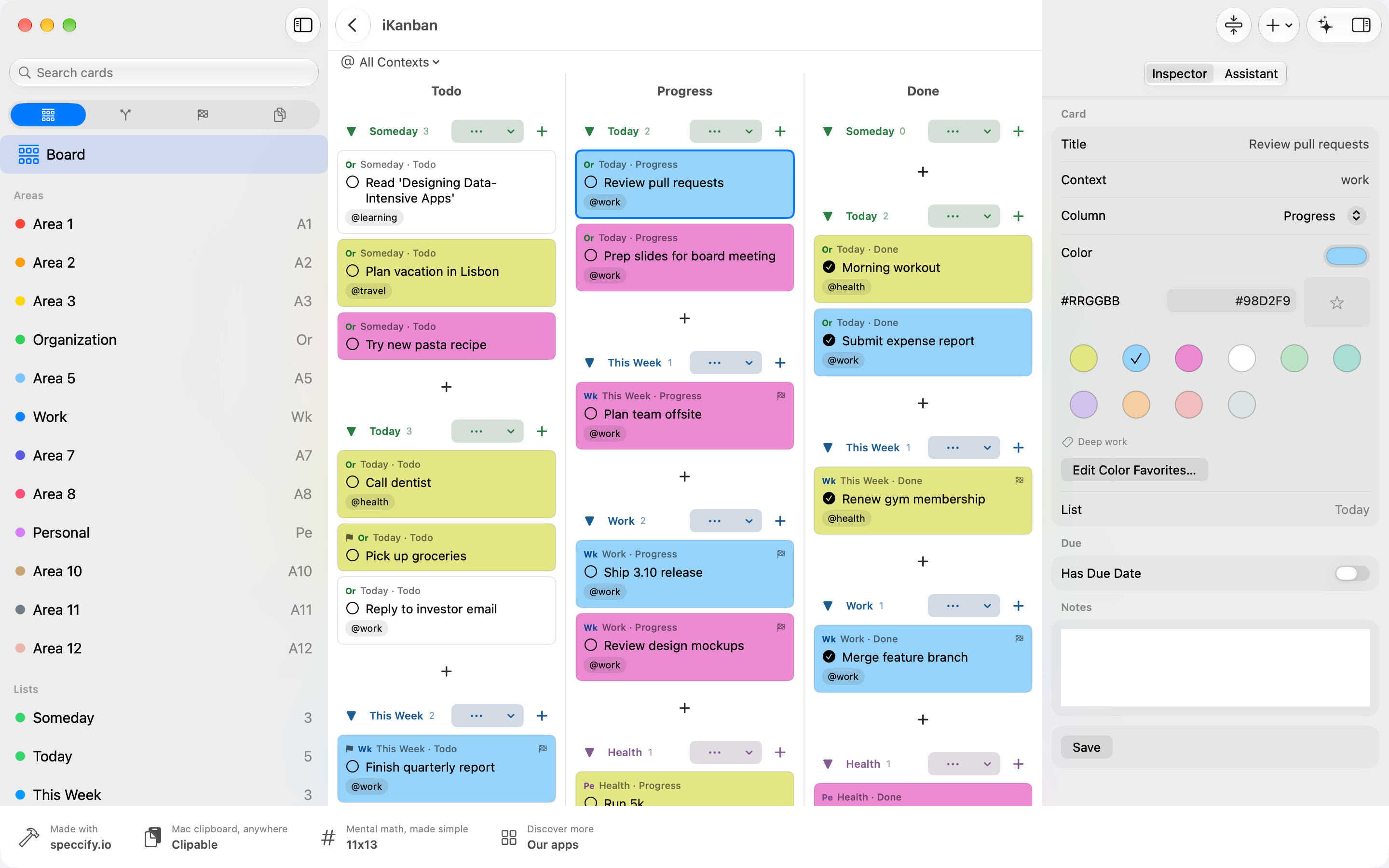
iKanban 4.0 is being prepared for release. This page previews the new workspace; the App Store may still offer 3.17. The native Mac app shown here is part of the upcoming release.
System requirements for 4.0: macOS 27, iOS 27 or iPadOS 27; watchOS 27 and tvOS 27 for the companion apps.
iKanban 4.0 keeps your board at the center: see what is next, what is in progress and what is done. Switch between cards and a compact list, group your reminder lists into projects, and search by title, notes, context or list name.
Five tabs connect your daily work. Kanban shows the board. Inbox brings together new tasks, Today with overdue cards, Waiting For and Someday/Maybe. Contexts (@) helps you find the right tasks by context or card color. Review guides you through your lists and shows what is still open. Documents keeps reference material within reach.
Flowcation is being developed separately for project planning, pinboards, sketches and mindmaps. Existing project material in iKanban remains reachable through Documents › Existing Projects… when present.
It's just Reminders
Every list and every card is a real Apple Reminder. Siri, shared lists and iCloud sync keep working — iKanban adds the board, nothing to import.
A real board
Todo, Progress, Done. Cards with colors, contexts and flags; drag and drop, several cards per row, a context filter and multi-select.
Getting Things Done
Inbox clarifying card by card, Today, Waiting For, Someday/Maybe, contexts and a guided Weekly Review that remembers each list.
Your projects and colors
Create as many projects as you need to group your lists. Choose any card color, name it in your color legend and assign it manually. Your legend syncs between devices.
Documents and reference material
Keep reference material in the iKanban folder in iCloud Drive and find it under Documents. Cards can link to attachments without a separate project workspace.
Everywhere you work
A native Mac workspace, iPad with a full-height inspector, and iPhone — plus Apple Watch, Apple TV, widgets, Siri and Shortcuts.
Flowcation will give project ideas their own space. The outlook explains this direction and what is still in development.
Explore what is in development
The guide is the same help you find in the app — in English, German, French, Spanish, Italian, Japanese and Simplified Chinese.